

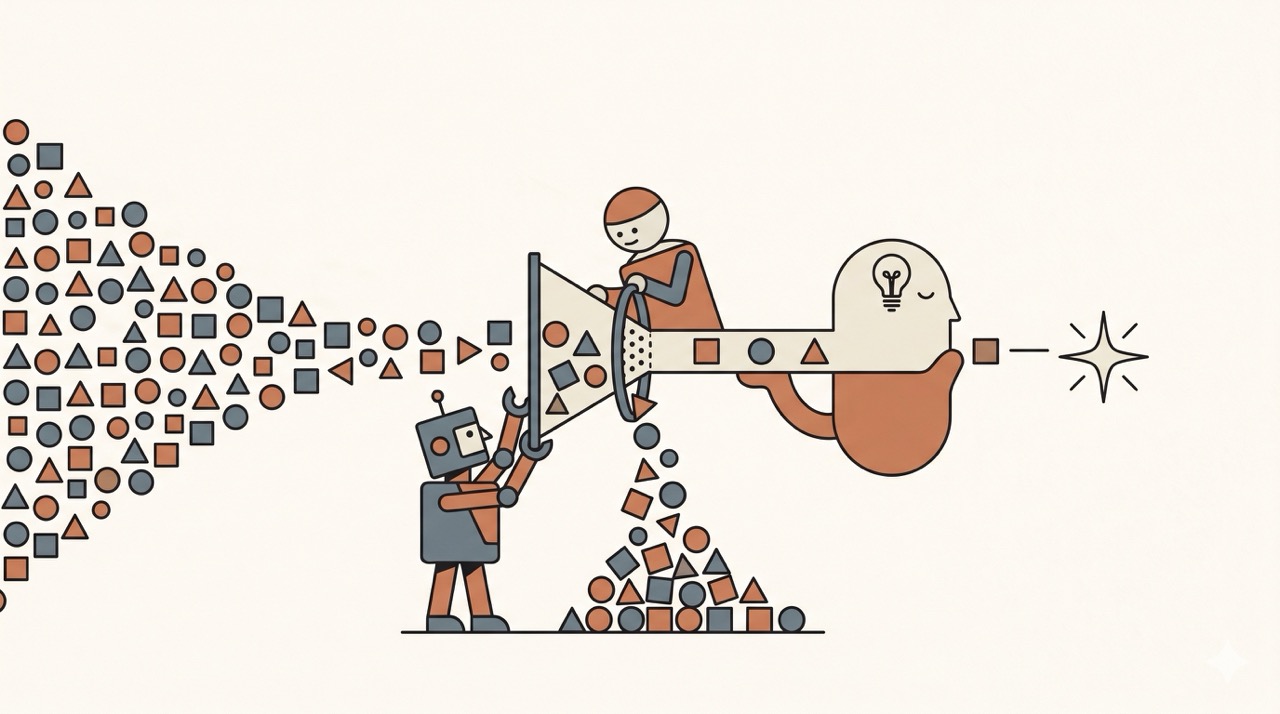
It started as a two-day notebook
A live-esports company wanted a raw match stream turned into real-time AI-generated content — produced live, the instant the action happens.
Picture a live esports broadcast where the system produces that content on its own, the moment a key play happens — each item tagged, timestamped, scored. Not a dashboard, not a batch report after the match: streaming data + live AI on top of the video, in real time. (Both the client and the exact content type are under NDA — anonymised here; the architecture and the patterns are what travel.)
Producing any of that takes two things: a model, and something to feed it. The model would need to be found, no question — but the input came first. No API, no telemetry, no event feed: just the video itself.
And the questions that decide a build aren’t just “does it work?” — they’re “at what cost per stream-hour, at what latency, and with which models and agent architecture can it run?”
So I didn’t build a product. I built a two-day proof-of-concept — a disposable notebook to settle exactly those questions before anyone funds a build. A PoC is a diagnostic instrument: it helps you sketch the AI models and get real metrics, but it isn’t built for production.
The first wall came before any AI: ingestion. Datacenter IPs (AWS, GCP, Azure) are blocked on sight by platforms like YouTube. A legal-gray industry — proxy/scraper services like Bright Data, Oxylabs or Apify — will fetch the video streams anyway, but it’s costly, fragile and potentially ToS-violating at scale.
The clean B2B path is unglamorous: the broadcaster sends you the feed directly, over standard broadcast protocols (RTMP/SRT) — zero legal risk, sub-second, built for live. Real-time streaming, solved at the source.
| Ingestion path | Legal risk | Covers live? | Cost / upkeep | Verdict |
|---|---|---|---|---|
| Broadcaster push (RTMP/SRT/SDI) | 🟢 None — off-platform, by contract | ✅ native | $ lowest, ~zero upkeep | the clean B2B path |
| Direct file upload (user MP4) | 🟢 None | ❌ VOD only | $ low | universal fallback |
| Creator OAuth (Twitch/Kick…) | 🟢 Very low — explicit consent | ⚠️ post-stream | $ low | clean, but no YouTube bytes |
| Reseller scraper API (Apify, Oxylabs…) | 🟡 Shifted to reseller | ⚠️ VOD | $$ medium + external SLA | risk & margin outsourced |
| Server-side scraping (yt-dlp + residential/mobile proxies) | 🟠→🔴 Moderate-to-high (ToS) | ⚠️ VOD | $$$ high, constant cat-and-mouse | B2C-dominant, doesn’t fit live B2B |
Then it had to keep up with the stream
Streaming data comes in; an AI-generated piece of content has to come out within seconds, live.
The pain isn’t throughput — it’s latency and ordering. You chop the live stream into short overlapping slices — windows — and decide, per window and within seconds, did something just happen? Keeping those calls fast and in the right order is what quietly becomes “a full-time person just to keep it up.”
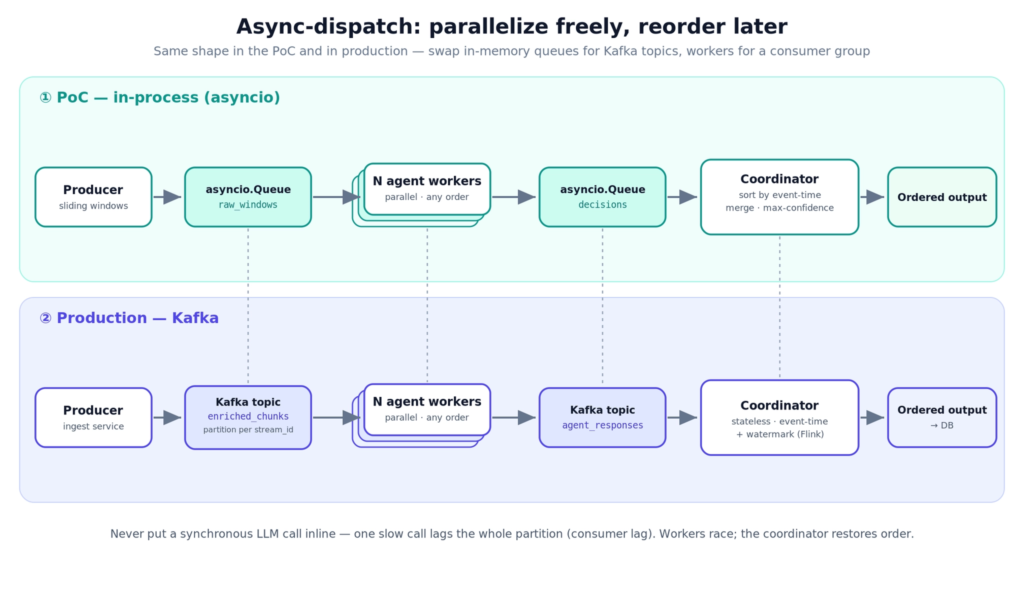
In the PoC the stages pass work to each other through simple in-memory queues (Python asyncio queues) — waiting lines where one stage drops a window and the next picks it up. That’s roughly how Kafka, the industrial message bus, behaves in production; here it’s just a lightweight stand-in. The real Kafka comes only when this goes live.
The trick: run everything in parallel, fix the order afterwards. Several workers grab windows and call the LLM at the same time; some answers come back slower than others, and that’s fine — each window carries its own timestamp, so nothing depends on finishing in order.
A final coordinator puts everything back in order: sort by timestamp, merge overlapping hits, keep the most confident one. The thing you never do is wait for the LLM inside the pipeline — one slow call and everything behind it backs up (the classic consumer lag).
The moment the LLM bill stopped making sense
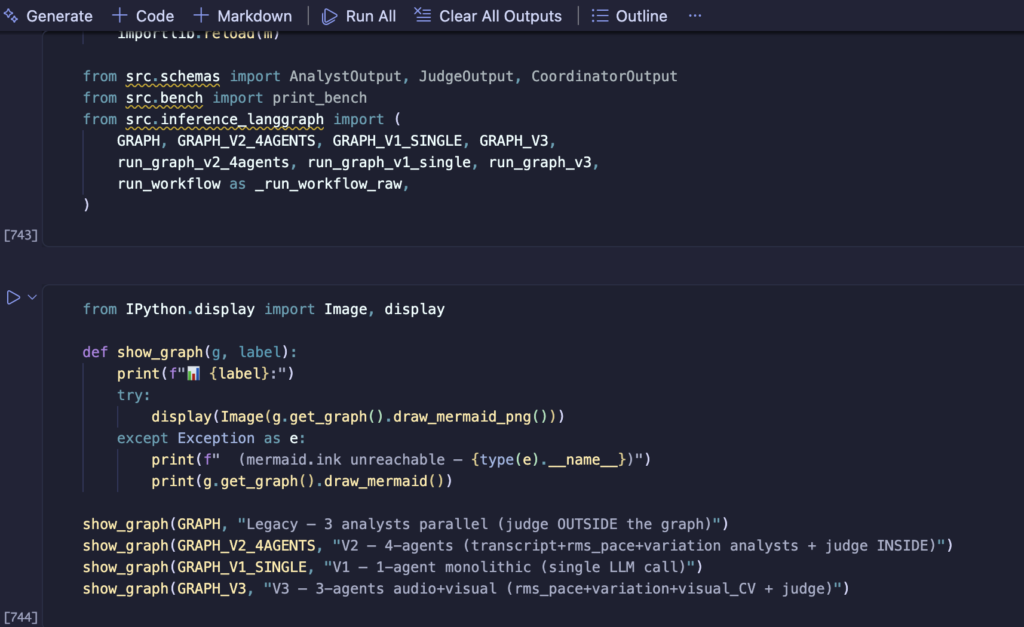
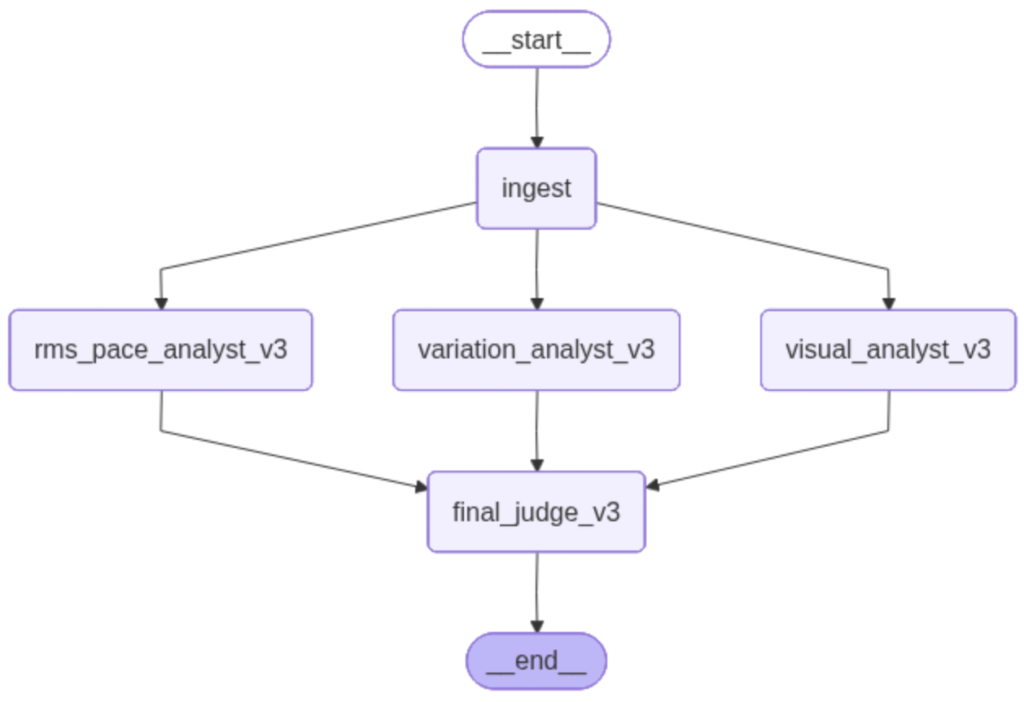
You don’t really know what live AI costs until you put it on one table — which model, how many agents, how much latency, at what price. So I ran the same LangGraph pipeline two ways: a single judge (one LLM call per window) versus a committee of specialist analysts feeding a judge — across a few models (Gemini Flash Lite, a nano-class model).
The cost spread was wide — the priciest setup ran several times the cheapest per stream-hour. (Exact $/h in the table; each call answered in low single-digit seconds, ~2–4 s.)
The real fix wasn’t a cheaper model. It was not calling the model on most of the stream. A live match is mostly nothing-happening — you shouldn’t pay an LLM to watch silence.
So a cheap, audio-only ML gate sits in front and throws away 80–90% of the windows — the quiet stretches — before any LLM call. The model only ever sees the 10–20% that might actually contain a highlight. Don’t send every frame to GPT.
Two more wins stack on top: transcribe the audio in one Whisper batch up front (≈10× cheaper than streaming it), and tell the model not to over-think (reasoning_effort=minimal) — so you pay for answers, not for invisible deliberation.
The gate alone cuts the LLM bill 5-10×, and the more streams you run at once, the more it saves. The goal: the most output per dollar.
| Setup | Model | $/h (LLM) | Latency | Accuracy |
|---|---|---|---|---|
| Single judge · 1 agent | nano-class | $0.19 | 3.9 s | 0 / 4 |
| Single judge · 1 agent | Gemini Flash Lite | $0.09 | 2.4 s | 3 / 4 |
| Committee · 4 agents (audio) | nano-class | $0.54 | 3.6 s | 3 / 4 |
| Committee · 3 + judge (audio+visual) | nano-class + OpenCV | $0.19 | 2.1 s | 3 / 4 (+) |
\ the audio+visual setup also caught the one highlight every audio-only setup missed. Gemini Flash Lite is the standout: across the cheap mini/nano-class models, a single Gemini call beat the nano-class on cost, latency and accuracy (3/4 vs 0/4), and matched the 4-agent committee at ~1/6 the price. Latency ran ~2–4 s per call (Gemini single 2.4 s, audio+visual 2.1 s = lowest). $/h is LLM cost per stream-hour, before the ML gate cuts it a further 5–10×.*
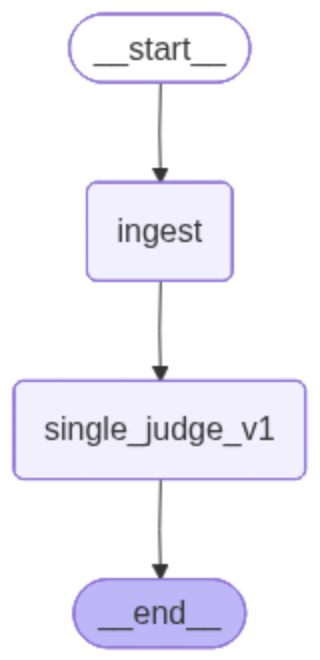
A cheap visual agent, and an ML filter that learned from the graph
Two results behind those numbers cut against intuition. First, a committee of cheap agents — four nano-class calls per window — caught highlights that a single call to the same model missed entirely. Stacking agents can rescue a weak model.
But one call to a better model matched that whole committee — same hits — at roughly 1/6 the cost. The lever was the model, not the agent count: adding agents to compensate for a weak model is the expensive way to buy accuracy.
The second surprise was visual — and it leaned on classic computer vision, not a vision LLM. The visual analyst runs OpenCV (a standard, free vision library) on one frame per second, simply measuring how much the picture changes frame to frame — brightness, colour, scene cuts. Cheap and instant, no heavy model needed. It gave the lowest-latency variant (~2 s) and caught a highlight the audio-only path missed entirely.
Then the ML filter — that cheap gate from earlier. To cut the bill it had to run on every window, which ruled out the GenAI reflex: a RAG pipeline on a vector DB would have added a retrieval hop to each one and blown the latency budget on a live stream. So it learned from the expensive setup instead. I let the costly committee label thousands of windows — highlight or not — then trained a tiny model to copy those calls: teacher → student. The student then runs for almost nothing and does the upfront filtering. The pattern is the point: generative AI trains a classic ML model — cheaper and faster — and the two run together, the ML model a gatekeeper that filters the stream and saves the tokens the LLM would otherwise burn. (The exact features and training recipe are the edge — that part stays private.)
The throughline: at this layer, cheaper and smarter point the same way — pick the right model, lean on classic ML where it beats an LLM, and let the architecture do the rest.
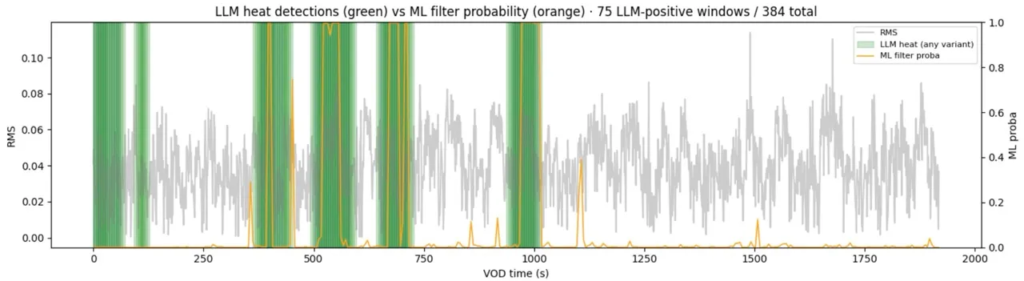
the ML gate (in orange) fires only on real heat (green), ignoring loud-but-empty RMS (grey) — only ~20% of windows (75/384) reach the LLM, on this pre-labelled sample video.
Streaming data + ML & GenAI at scale — the event-driven path to production
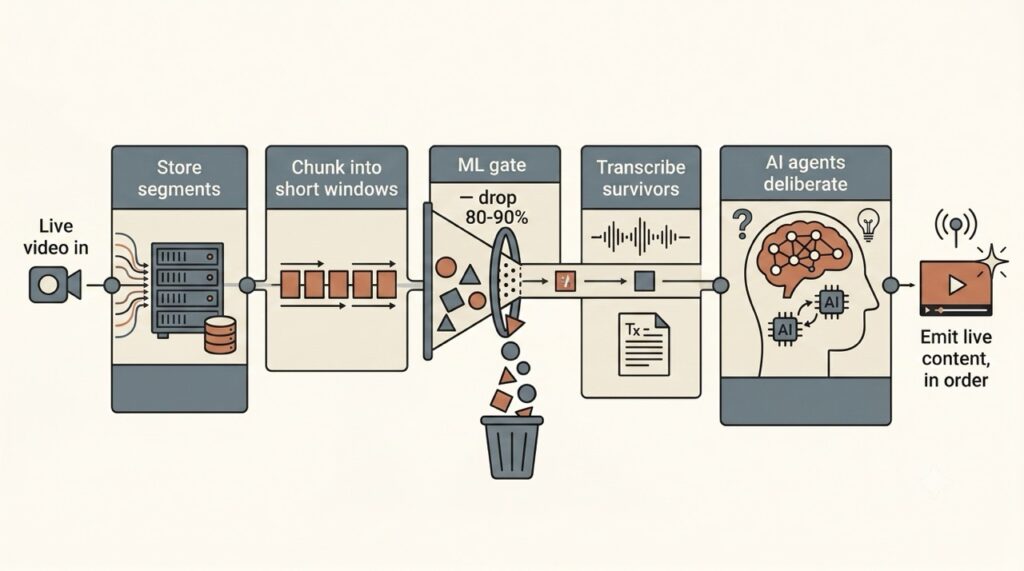
So how do you actually run GenAI or ML on live video? The recipe barely changes between projects: take the feed in, cut it into short windows, let a cheap ML model drop the 80–90% where nothing happens, and call the expensive generative model only on the moments that survive — then emit the results in order, as a stream of events. Everything below is about making those four moves hold up at scale.
Nothing in the PoC was throwaway. Those in-memory async-io queues were a stand-in for Kafka: in production each one becomes a Kafka topic — a durable, replayable waiting line — and the code around them barely changes. You swap the lightweight plumbing for the industrial version; the design stays identical.
That gives you a proper event-driven architecture: each of the five stages runs as its own service, scaling on its own, for example on ECS or Kubernetes / EKS. Streams stay isolated — one partition per stream — so a slow LLM stage just gets more workers without slowing ingestion. Real-time streaming, decoupled end to end.
This is where the ML gate stops being a nice-to-have and becomes the business case. Because it skips 80–90% of the stream, you pay the LLM on only one window in five to ten — and that holds on every stream at once. One stream or a thousand, the LLM bill stays 5–10× lower: the line between a cost you can plan and one that explodes as you grow.
The target stack is standard and deliberately boring: a managed event bus, container compute, object storage, a results table — provisioned as code with Terraform. The PoC’s job was a directional cost envelope — a defensible $/stream-hour for a board deck — not a bill of materials. Exact topology, sizing and rollout sequence are the build itself.
💡 Have a streaming-data + AI idea that needs de-risking? A two-day PoC + readout settles cost, latency and architecture before you fund production.
Classic ML or generative AI? Where each model lives
The tooling around AI looks like alphabet soup — Bedrock, SageMaker, MLflow, vLLM, Groq. Underneath, there are only two kinds of model, and they live in completely different places.
| Classic ML — your model | Generative AI — the vendor’s model | |
|---|---|---|
| Examples | LightGBM, XGBoost — the gate (embedded or on SageMaker) | Bedrock, Azure OpenAI, Gemini, Groq (on-demand models) |
| Who trains it | you, on your data | the vendor, pre-trained |
| Where it lives | a file you ship (.joblib, ONNX) — in your service or on your server | on the vendor’s servers; you never see it |
| How you call it | loaded in-process, or on a box you control | on-demand, over an API |
| Cost / latency | ~free per call, milliseconds | pay-per-token • network round-trip |
The build doesn’t pick one — it combines them. A classic-ML model you own runs the cheap, constant work (the gate); a generative model you rent does the heavy reasoning on the fraction that’s left. Most of the stream never reaches a paid token.
One practical consequence: managed FM APIs like Bedrock and Azure OpenAI serve generative models only — they don’t host a classic-ML model like the gate. That layer lives embedded, or on a platform like SageMaker. The two families aren’t interchangeable, and keeping the cheap, always-on filter off a per-token API is exactly what protects the cost curve.
Two things sit beside this, not inside it: MLflow versions and registers the models you train (it doesn’t serve them), and orchestration frameworks like LangGraph or LangChain wire the agents together. Useful — but neither is where a model actually runs.
Pick the right home for each family and the architecture almost designs itself. (A follow-up takes the serving side deeper — embedded vs self-hosted vs managed, and when each pays off.)
Close
Note: this is a real engagement, anonymised. The client and any identifying details have been removed and the use case is described in general terms; the architecture, the measurements and the trade-offs are unchanged.